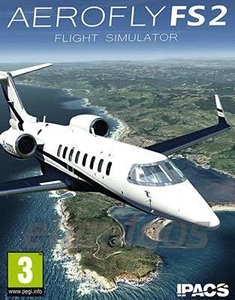
Game Description
Aerofly FS 2, also known as Aerofly Flight Simulator 2, drops you straight into the cockpit with minimal fuss. Ever wondered how flying a jet or helicopter feels without dealing with piles of paperwork? This flight sim focuses on giving you a hands-on experience with realistic flying physics and detailed landscapes. It’s not just about takeoff and landing—navigation, weather, and aircraft maintenance all come into play. Curious if you have what it takes to become a virtual pilot? Keep reading.
What to Expect in Aerofly FS 2
This isn’t your average flight game where you mash buttons and watch the scenery pass. Aerofly FS 2 offers a more grounded experience with interactive cockpits and responsive controls. Want to try something simple or jump in with the big jets? The variety has you covered.
Key Features
- Realistic Flight Physics: Feel how the aircraft reacts to your inputs and weather changes.
- Interactive Cockpits: Every button and dial responds—no fake panels here.
- Wide Aircraft Selection: From small planes to large jets and helicopters.
- Training Mode: New pilot? Tutorials and guided sessions help you get started.
- Scenic Environments: Fly over detailed landscapes and variable weather conditions.
- Aircraft Maintenance: Refuel and repair – yes, you actually need to manage that.
- Obstacle Challenges: Think you can navigate tricky mountain passes? Give it a shot.
Why Give Aerofly FS 2 a Try?
Ever sat back and thought flying looks cool, but felt overwhelmed by complexity? Aerofly FS 2 keeps things accessible without dumbing it down completely. The training mode is especially handy—you don’t have to be an expert to have fun here. Plus, the immersive cockpits make you feel like you’re really pressing buttons, which is oddly satisfying.
Lesson learned: always check your fuel before taking off – running out mid-air? Not so fun. Need a challenge? You got it. The game balances casual flying with enough depth to keep things interesting.
Final Thoughts
Aerofly FS 2 Flight Simulator offers a solid alternative to heavier sims with its smooth learning curve and decent realism. It doesn’t overwhelm, but it also won’t bore you. If you want to test your pilot skills without diving into complicated manuals, this one’s worth a spin. Ready to see the world from above?
System requirements
- Minimum Requirements:
- Processor: Intel Dual core CPU 2.4 GHz
- Graphics: 1 GB VRAM
- Memory: 4 GB RAM
- Disk space: 150 GB HDD
- Operating system: 64bit Versions of Windows 7, Windows 8, Windows 10