Flip Your Switch to Evolve Inkay — The Exact Trick to Get Malamar in Pokémon Legends: Z-A

If you want to turn your Inkay into Malamar in Pokémon Legends: Z-A, it’s mostly straightforward — but there are a few specific steps to follow. Read on and you’ll evolve that cephalopod buddy in no time.
- How to evolve Inkay in Pokémon Legends: Z-A
- Requirements
- Step-by-step evolution
- Troubleshooting and notes
How to evolve Inkay in Pokémon Legends: Z-A
To evolve Inkay into Malamar you must meet a small set of conditions and then perform one simple action in the menu. First, make sure Inkay is in your active party and has reached level 30. Next, use the game in a very specific way: play in handheld mode with the Joy‑Cons attached and disconnect any other controllers. Finally, flip your console upside-down and select the “Evolve” option for Inkay in the Pokémon menu. Do that before you flip the console back over, and the evolution will complete.
Requirements
Here are the concrete requirements you need to satisfy:
- Inkay must be in your party (not in boxes).
- Inkay must be at least level 30.
- Play in handheld mode with the Joy‑Cons attached to the console.
- Disconnect all other controllers (including Pro Controllers and additional Joy‑Cons).
Step-by-step evolution
Follow these steps in order:
- Confirm Inkay is level 30 and in your party.
- Attach the Joy‑Cons and switch the game to handheld mode.
- Disconnect any other controllers.
- Flip the console upside-down.
- Open the Pokémon menu, select Inkay, then choose the “Evolve” option.
- After you press “Evolve,” you can flip the console back over and resume play.
Note that you will not see the usual evolution arrow above Inkay’s sprite. Instead, the “Evolve” command appears when the console is upside-down and the other conditions are met.
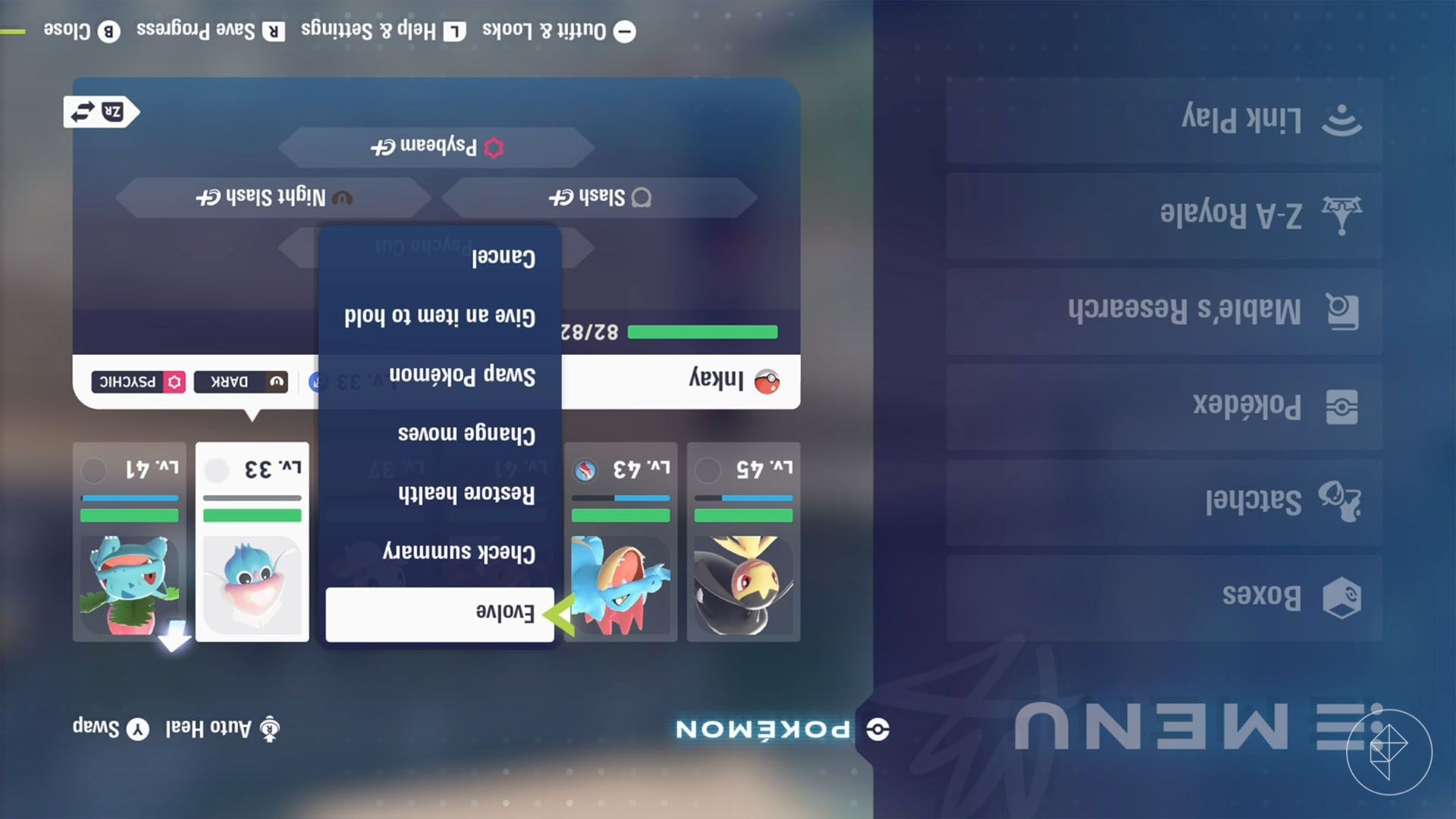
Image: Game Freak/The Pokémon Company, Nintendo
Troubleshooting and notes
If the evolution option doesn’t appear, check these points:
- Make sure no other controller is connected — even a synced Pro Controller can block the evolution.
- Confirm the Joy‑Cons are attached and the system is actually in handheld mode.
- Verify Inkay is level 30 or higher.
Also, unlike some older titles, you do not need to level Inkay while the console is upside-down. Instead, the upside-down step is only required to trigger the on-screen “Evolve” option.