Game Description
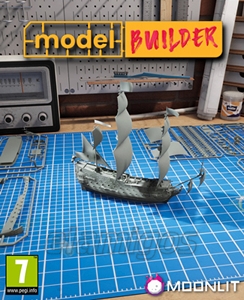
Model Builder, also known simply as Model Builder Simulator, is a hands-on PC game where you assemble and paint detailed scale models of cars, planes, and ships. Think of it as a virtual craft desk packed with tiny parts, glue sticks, and paintbrushes—but minus the mess. If you’ve ever wanted to build model kits without hunting down glue or worrying about tiny pieces disappearing under the couch, this game is a cool spot to try.
What’s the Deal with Model Builder?
So, what do you actually do here? You pick a model from a virtual shelf, then start snapping together parts from a first-person view. It’s got that satisfying buzz of patience and precision. After assembly, it’s time for painting—choosing colors, adding designs, making your model stand out on your digital shelf. Need a challenge? You got it. Unlock better tools as you go to make your builds more professional.
Key Features
- First-person perspective lets you feel like you’re right at the workbench
- Wide range of vehicle models: cars, planes, ships—pick your passion
- Detailed assembly with cutting, gluing, and sanding components
- Custom paint options for endless creative possibilities
- Progressive tool upgrades keep the crafting fresh and engaging
- Relaxed pace with no timers or pressure—perfect for unwinding
- Free to download, making it easy to jump in and start building
How It Feels to Play
Imagine sitting down with a trusty glue stick—lesson learned: always carry a spare—and a box full of tiny parts. You’re not racing the clock; it’s about getting every piece in the right spot and making it look right. The visuals help here. The models pop in sharp 3D detail, and the lighting adds just enough shine to make your work feel tangible.
Who Should Try Model Builder?
Are you into model kits but want a zero-mess version? Or maybe you like chill, creative games that don’t demand fast reflexes? Model Builder fits in nicely. It’s casual enough for beginners and rewarding for hobbyists who crave that satisfying build-and-paint cycle. Plus, it’s a neat way to unwind after a hectic day.
Final Thoughts
Model Builder isn’t here to reinvent the wheel—it’s a simple, focused experience on crafting miniatures without the usual fuss. If you enjoy hands-on projects and want to flex your artistic side digitally, give it a shot. Just remember, patience is part of the fun, and yes, spare glue sticks are a must.
System requirements
- Minimum:
- Processor: Intel Core i5-9400 2.9 GHz / AMD Ryzen 5 2600 3.4 GHz
- Graphics: 4 GB GeForce GTX 1050 Ti / Radeon RX 570
- Memory: 8 GB RAM
- Disk space: 20 GB SSD
- Operating system: Windows 10 64-bit
- Recommended:
- Processor: Intel Core i7-9700 3.0 GHz / AMD Ryzen 7 3800X 3.9 GHz
- Graphics: 8 GB GeForce RTX 2060 Super / Radeon RX 5700
- Memory: 16 GB RAM
- Disk space: 20 GB SSD
- Operating system: Windows 10 64-bit